If you record sources who could be harmed by exposure, the safest transcript is one that is made on your own phone and never uploaded. ScribeKit does exactly that on iPhone and iPad: the speech model is inside the app, there is no account and no server. It narrows who can reach your audio. It does not make your phone safe on its own.
I make ScribeKit, so weigh what I say about it accordingly. I have tried to keep this page useful even if you never install it: the threat model, the advice press-freedom groups actually give, and a workflow that works with any on-device tool.
Why is cloud transcription a risk for confidential sources?
When you upload an interview to a transcription service, a second copy now exists on someone else's computers. That copy can be read by staff under the vendor's policies, passed to subprocessors, used to improve models if the terms allow it, exposed in a breach, or handed over in response to legal process. None of that requires anyone to act in bad faith.
Two dated examples, both involving one of the most widely used transcription services in newsrooms:
- February 2022. A Politico reporter interviewed a Uyghur human-rights advocate and transcribed the call with a popular cloud transcription service. A day later the service sent him a survey asking about the purpose of the recording, which was titled with the source's name. The company later said it only responds to information requests from US-based law enforcement. Bruce Schneier's summary of the Politico story (17 February 2022) links the original.
- August 2025 to August 2026. A class action filed in federal court in California alleges that the same service's meeting assistant recorded conversations without proper consent and used the recordings to train its speech models (National Law Review, 30 August 2025). On 13 August 2026 the judge dismissed some claims and let others, including the wiretap and biometric claims, go forward (the court's order, case 25-cv-06911, N.D. Cal.). These are allegations, not findings, and the case is about meeting bots rather than journalists.
The point is not that one company is uniquely bad. It is that any service that holds your audio becomes part of your threat model, and you cannot audit it from the outside. On-device transcription removes that party. What is left is you, your phone and your backups, which is a smaller and more familiar problem.
What do press-freedom groups recommend for transcribing interviews?
The groups that train journalists on digital security agree on the principle and stop short of naming a phone app.
The Freedom of the Press Foundation's security trainer Martin Shelton writes, in an advice column on AI transcription tools (20 March 2025, updated 1 June 2026): "For topics that are too sensitive to entrust to a third party, I've been getting into the habit of using offline transcription tools that run on my device instead, such as OpenAI's Whisper, though this does take a little more technical knowledge." He adds that "sometimes the easiest and safest choice is to transcribe the relevant sections of sensitive interviews by hand."
FPF's longer review, How secure are journalists' favorite transcription tools? (first published 19 January 2022, updated 1 October 2026), goes service by service through who can access uploaded files and whether recordings are used for training, and, for keeping transcripts away from third parties, mentions on-device options such as running Whisper yourself or Apple's Voice Memos transcription, with a note to turn on Advanced Data Protection if those memos sync to iCloud.
The Reynolds Journalism Institute (RJI) evaluated five transcription services (3 February 2025) and quotes FPF's Davis Erin Anderson: it is sometimes best "to simply not enter any data into a transcription or other third party service." For interviews with an off-the-record part, she suggests splitting the recording so only the on-the-record portion goes through a transcriber.
CPJ's Digital Safety Kit (updated 20 February 2026) covers the device side: "Lock devices with a password or PIN. Longer PINs or passwords are more secure." It also warns that your phone "may back up your data to the cloud account linked to the phone. Information stored in the cloud may not be encrypted."
An on-device app is what that advice looks like on a phone: Whisper-class models without the command line, and no third-party service in the loop.
How do I check that a transcription app doesn't upload audio?
Don't take an app's word for it, including mine. The quick test is Airplane Mode: turn it on (and turn Wi-Fi off, since Airplane Mode can leave Wi-Fi on), record a short clip, and see whether the app still produces a transcript. An app that needs a server will fail, stall, or queue the file "until you're online." I wrote up the full method, including how to watch for network activity, in how to check if a transcription app is really offline.
Then read the App Store privacy label. ScribeKit's declares one data type: purchase history, not linked to your identity and not used for tracking. There is no analytics library, no crash reporter and no account.
When the phone is online, ScribeKit makes one kind of automatic request, when it opens or returns to the foreground: it asks RevenueCat, its purchase service, whether you have Pro, sending an anonymous ID and purchase history, never audio or text. Everything else is started by you: downloading an optional Whisper model, buying or restoring Pro through Apple, and opening the privacy policy or terms in your browser. In Airplane Mode none of this happens and transcription works the same.
How do I transcribe interview audio to text on iPhone without uploading it?
Here is the workflow I would use for a sensitive interview. Most steps apply to any on-device app.
- Prepare the phone. A strong passcode, the latest iOS, and a decision about iCloud Backup (see the limits below). If you want certainty during the interview, switch on Airplane Mode before you start.
- Get consent to record. Recording-consent law differs by country and US state and applies to you whatever app you use. Check it before you press record.
- Record, or import. Record in ScribeKit; the recording keeps running with the screen locked, and Pause and Stop sit on the Lock Screen and in the Dynamic Island. If part of the conversation goes off the record, pause, which follows Anderson's advice to keep that part out of the transcriber entirely. If you recorded on another device, import the file from Files or send it to ScribeKit from the share sheet.
- Transcribe. It happens on the phone when you stop. The built-in model detects the language.
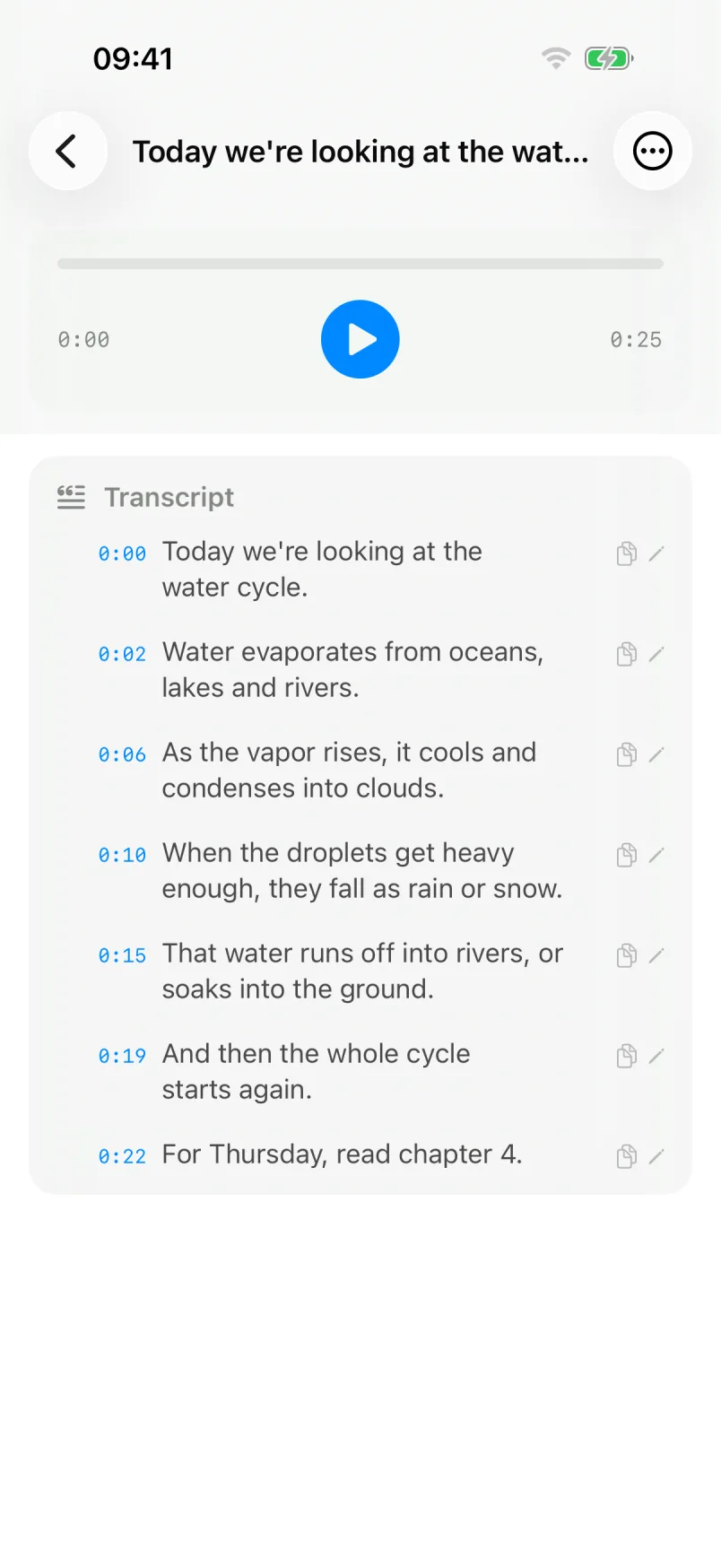
- Verify every quote. Each transcript is split into timestamped segments. Tap a line to hear the audio behind it, fix any word in place, and copy the text with timestamps so your notes point back to the exact moment.
- Export deliberately. Copy or share the text or the audio where you choose. Pro adds a ZIP export of everything. Remember that the moment you paste a transcript into a cloud document, that service has a copy.
- Delete when you're done. Deleted items go to a recycle bin for 30 days; empty it to remove them for good. Auto-delete can clear old transcriptions after 7, 30 or 90 days.
The free version covers 10 transcriptions a month, up to 30 minutes each. ScribeKit Pro removes the monthly limit and allows recordings and imports up to 3 hours (90 minutes while a Whisper model is active). Details are on the ScribeKit page.
Can I transcribe interviews in other languages?
Yes. The built-in model, NVIDIA's Parakeet, understands 25 languages and detects which one is being spoken: English, most EU languages, Russian and Ukrainian. That covers a lot of European reporting with nothing to download.
For other languages, ScribeKit Pro offers OpenAI's Whisper models, which cover about 100 languages. Each model is a one-time download from its public repository, so do it before you travel, on a network you trust. After that it runs offline like the built-in model. With a Whisper model active, recordings are capped at 90 minutes because of how much memory the larger models need on a phone. Whisper also lets you set the language by hand, which helps when a speaker switches languages or has a strong accent.
Accuracy varies by language, accent and recording conditions for every model. For a quote you will publish, the audio is the source of truth and the transcript is the index.
What does on-device transcription not protect against?
This is the part a marketing page usually leaves out, and it matters more than anything above.
- The phone itself. If your phone is seized, searched at a border, or unlocked under pressure, everything on it is exposed, including ScribeKit's recordings. A long passcode is the baseline. Delete interviews you no longer need.
- Your backups. ScribeKit stores audio and transcripts in its own app storage, which is included in iCloud Backup and computer backups like any other app data. Under Apple's standard data protection, Apple holds the keys to iCloud Backup; with Advanced Data Protection turned on, Apple says it cannot decrypt the backup. Decide which you want, or turn off iCloud Backup for the phone you report with.
- Your own copy. No server on my side means no vendor to subpoena for your interview. It does not mean the recording can't be demanded from you. Legal process can still reach the person holding the file.
- Where you send things. Sharing a transcript to email, a chat app or a cloud document puts a copy there.
- Human error and malware. A compromised phone defeats any app. Keep iOS updated.
FPF's and CPJ's guides above are the right next read for this part.
What can't ScribeKit do?
Plainly, so you can choose something else if you need it:
- No speaker labels. ScribeKit does not tell you who said what. You can edit a segment to add a name. If you transcribe non-sensitive meetings and want speaker labels in real time, a cloud service does more.
- No live transcript. The text appears after you stop recording, not while you talk. Apple's Voice Memos shows a transcription while you record on iPhone 12 or later, in ten languages.
- No call recording. ScribeKit records through the microphone and imports files. It does not record phone calls.
- No AI summaries, no Mac app, no Apple Watch app. It is a transcriber for iPhone and iPad.
If those trade-offs fit your work, ScribeKit is free to try, with no account to create.