With your lecturer's permission, you can record a lecture on your iPhone and have the audio turned into searchable, timestamped text on the phone itself, with no upload and no Wi-Fi. ScribeKit does this for free in 25 languages: 10 transcriptions a month, up to 30 minutes each. ScribeKit Pro removes the monthly limit and handles full lectures of up to 3 hours.
I make ScribeKit. Below is the setup I would use as a student, including where Apple's free Voice Memos transcript is enough and where it isn't.
Can I record a lecture legally?
Ask first, every time. Most universities allow students to record lectures only with the instructor's permission or as an approved disability accommodation, for personal study, and without sharing. Two current examples:
- Syracuse University's Classroom Recording Policy (approved 7 August 2025) "strictly prohibits stealth or covert recording in classes by instructors and/or students." It counts transcription by an AI app as a class recording too. Students need advance permission from the instructor and must confirm in writing that they won't distribute the recording, or go through the Center for Disability Resources for an accommodation.
- Southern Methodist University's policy on recording in academic settings (adopted 11 February 2026) allows recording "only with the express prior written permission of the instructor or as approved through" its disability accommodations office, restricts recordings to personal use, and says students can't keep them beyond the current term.
If you have a disability that affects note-taking, recording lectures is a common accommodation. NC State's disability office, for example, explains what its recording agreement asks of students: personal study use, no sharing without the lecturer's permission, and stopping the recording when asked.
Your university's rules may differ, so find its policy before the first class. One thing an on-device app does help with: a recording that stays on your phone and is transcribed there is not handed to a third-party service, which is often exactly what an instructor worries about.
Can Voice Memos transcribe lectures for free?
Sometimes, and it is worth checking first. Apple's iPhone User Guide says Voice Memos transcription "is available on iPhone 12 or later in English (all variants), Spanish, Portuguese, Italian, French, German, Japanese, Korean, Simplified Chinese, and Traditional Chinese," and that it is not available in all countries or regions (Apple's guide). It needs iOS 18 or later. A nice touch: it shows the transcript while you are still recording.
Where it stops:
- Older iPhones. An iPhone 11 or earlier gets no transcript.
- Languages. If your lectures are in Polish, Dutch, Swedish, Greek, Czech, Ukrainian or another language outside those ten, there is no transcript. There is also no language picker.
- Imported files. Apple documents no way to bring an MP3 or M4A from Files, a classmate or a learning platform into Voice Memos for transcription.
If Voice Memos covers your phone and your language, use it. If it doesn't, or you want the transcripts searchable alongside your other recordings, that is the gap ScribeKit fills. More detail in how to transcribe voice memos on iPhone.
How long can a lecture recording be?
This is the part to know before your first 90-minute seminar.
- Free: 10 transcriptions a month, up to 30 minutes each. The count is per calendar month, covers recordings and imports, and re-transcribing an existing recording doesn't count.
- ScribeKit Pro: up to 3 hours per recording or import (90 minutes while a Whisper model is active), and no monthly limit.
In the last ten minutes before the limit, the recording screen counts down ("until 30 minutes limit"). When the limit is reached, ScribeKit stops and saves the recording, so nothing is lost; it transcribes what you have. An imported file longer than your limit is refused with a message instead of being cut.
On the free version, a 30-minute tutorial or office-hours answer fits easily. A 50-minute lecture means stopping and starting a second recording, which uses two of your ten. If you record most of your lectures, Pro is what you want: $1.99 a month, $9.99 a year with a 7-day free trial, or $19.99 once for life (prices vary by country).
One more limit: if you switch to one of the optional Whisper models, recordings are capped at 90 minutes, because the larger models need a lot of memory on a phone. The built-in model has no such cap.
How do I set up my iPhone to record a long lecture?
A few habits make a bigger difference to the transcript than any model:
- Sit near the speaker or the speaker's loudspeaker. Distance and room echo cost more accuracy than anything else. Lay the phone flat, screen up, with nothing covering it.
- Lock the phone. Recording keeps going with the screen off. A Live Activity on the Lock Screen and in the Dynamic Island shows the timer with Pause and Stop, so you can pause during a break without unlocking.
- Set an auto-stop. If you know the lecture ends at a fixed time, set an auto-stop timer so you don't record the corridor afterwards.
- Bluetooth microphones work if you have to sit far back.
- Check storage and battery before a long session, and turn on Do Not Disturb so a call doesn't interrupt.
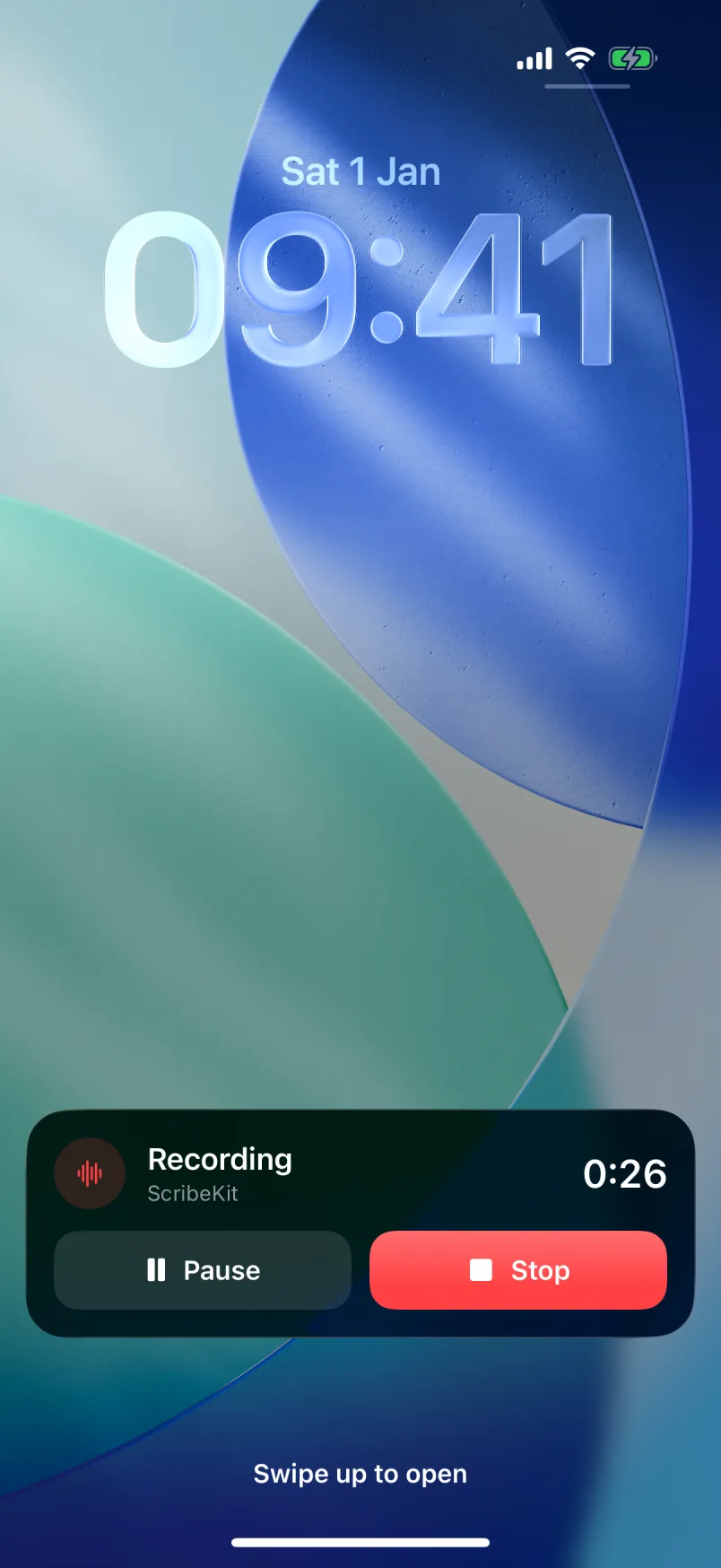
When you tap Stop, the transcript is made on the phone. You don't need to stay online, and you can leave the hall while it works.
How do I transcribe a lecture recording I already have?
Lecture audio often arrives from somewhere else: a recording from your department, a file a classmate shared with permission, or a memo you made last term.
- From Files: tap the import button on ScribeKit's home screen and pick the file. It accepts the audio formats iOS plays, including M4A, MP3, WAV, AIFF and CAF. Video files aren't supported, so export the audio track first if your lecture is a video.
- From Voice Memos or any other app: use the share sheet, choose ScribeKit, tap Add, then open ScribeKit. The file is copied in and transcribed on the phone.
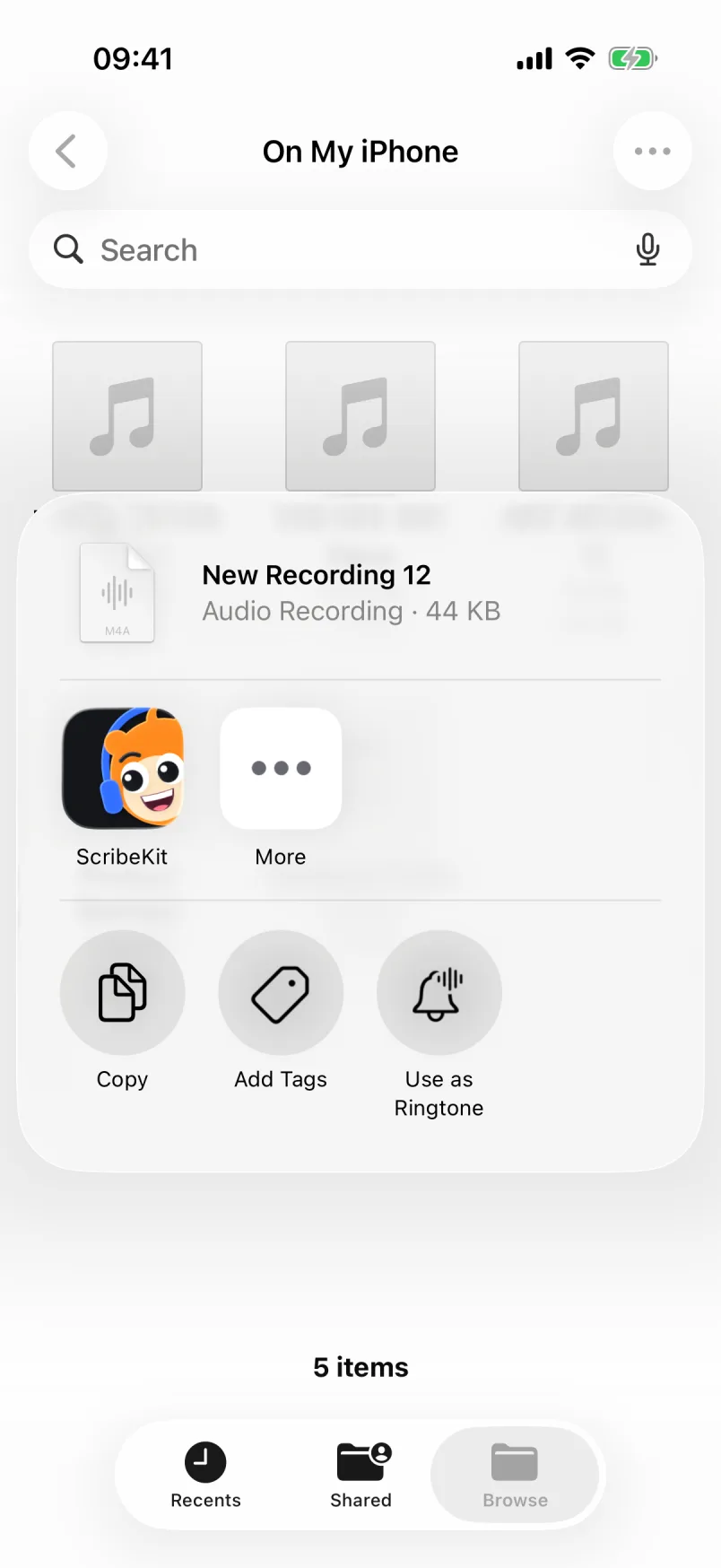
Imports count toward the free monthly ten and the 30-minute limit just like recordings. For more on file types, see how to transcribe an audio file on iPhone.
How do I revise from a lecture transcript?
The transcript is most useful as an index into the audio, not as a replacement for it.
- Search across everything. The search field on the home screen looks through the titles and the full text of every transcript, so "eigenvalue" finds the lecture where it came up.
- Tap to hear. Each transcript is split into timestamped segments. Tap a line and the audio plays from that moment, which is the fastest way to recheck a definition or a formula the model got wrong.
- Fix as you go. Edit a segment's text in place, so your transcript gets better each time you revise.
- Copy with timestamps. Copy the plain text into your notes, or copy it with timestamps so each note points back to the moment in the recording.
- Stay organized. Favorites and smart filters are free; folders per module are part of Pro.
Export works the way you'd expect: copy or share the text or the audio into Notes, Notion, Google Docs or wherever you study. Pro adds a ZIP export of all your transcripts and audio at the end of term. Remember that pasting into a cloud app puts a copy there, and that most recording policies ask you to keep lecture recordings to yourself.
Which languages can international students use?
The built-in model understands 25 languages and detects which one is being spoken, for free: Bulgarian, Croatian, Czech, Danish, Dutch, English, Estonian, Finnish, French, German, Greek, Hungarian, Italian, Latvian, Lithuanian, Maltese, Polish, Portuguese, Romanian, Russian, Slovak, Slovenian, Spanish, Swedish and Ukrainian.
That helps in two situations: studying in one of those languages, and keeping your own voice notes in your first language while your lectures are in English. Each recording is detected separately, so you don't have to switch anything.
For other languages, such as Chinese, Japanese, Korean, Arabic, Hindi or Turkish, ScribeKit Pro adds OpenAI's Whisper models, which cover about 100 languages. Each model is a one-time download, so do it on campus Wi-Fi; after that it runs offline. I compare the two kinds of model in Parakeet vs Whisper on iPhone.
ScribeKit transcribes; it does not translate, summarize or write notes for you. You get the words the lecturer said, with the audio one tap away.
What doesn't ScribeKit do?
So you can decide before installing:
- No live transcript. Text appears after you stop recording.
- No speaker labels. In a seminar, it won't mark who asked which question.
- No AI summaries or flashcards. It gives you the transcript, not a study guide.
- No Mac app and no Apple Watch app. iPhone and iPad only.
If that fits how you study, ScribeKit is free to try and asks for nothing but the microphone.