To transcribe a voice memo on iPhone, open Voice Memos, tap the recording, tap the More button (three dots) and choose View Transcript. That works on an iPhone 12 or later running iOS 18 or later, in ten languages. If the option is missing, share the memo to an app that transcribes on the device instead. Both routes are below.
I make ScribeKit, one of those apps, so I will say clearly where Apple's free feature is the better choice. For most people with a recent iPhone who speak English, it is.
How do I see the transcript in Voice Memos?
Apple's iPhone User Guide describes two ways, and the steps are the same in the iOS 27, iOS 26 and iOS 18 editions apart from small icon names.
After recording:
- Open the Voice Memos app (it lives in the Utilities folder if it is not on your Home Screen).
- Tap the recording you want.
- Tap the More button (the three dots). On iOS 18 Apple calls it More Actions.
- Choose View Transcript to read the text and select part of it, or Copy Transcript to copy everything and paste it into Mail, Notes or a document.
While recording:
- Tap the red Record button.
- Swipe up from the top of the waveform, then tap the Transcription button.
- The waveform is replaced by the live transcript, with the current word highlighted. Tap the same button to go back to the waveform.
Two more things the guide confirms. First, search covers transcripts: search your recordings list and it shows memos whose title or transcript contains that text. Second, old recordings are not left out: "If you open a recording made in an earlier version of Voice Memos (iOS 17 or earlier), Voice Memos will transcribe it automatically if it includes recorded speech." So on a supported iPhone, a memo from 2022 gets a transcript the first time you open it.
On an iPhone with Apple Intelligence (iPhone 15 Pro, iPhone 15 Pro Max or any iPhone 16 or later on iOS 27, per the same guide), you can also summarise a transcript with Writing Tools. That is a real advantage of the built-in route: ScribeKit has no AI summaries.
Why is there no Transcript button in Voice Memos?
Apple's requirement note is one sentence: "Audio transcription is available on iPhone 12 or later in English (all variants), Spanish, Portuguese, Italian, French, German, Japanese, Korean, Simplified Chinese, and Traditional Chinese. It's not available in all countries or regions." Each part of that sentence is a reason the option can be missing.
Your iPhone is older than an iPhone 12
The iPhone 11, iPhone 11 Pro, iPhone 11 Pro Max and iPhone SE (2nd generation) all run iOS 27, but none of them gets Voice Memos transcription. Updating will not change that. See the iPhone 11 section below.
You are on iOS 17 or earlier
Transcription arrived with iOS 18. Check Settings, General, About for your version, and Settings, General, Software Update to update.
Your country or region is not supported
Apple says the feature is "not available in all countries or regions" and does not publish the list on that page. If everything else checks out and the option still never appears, region is the likely cause.
The recording is in a language Apple does not transcribe
Voice Memos has no language picker. Apple's Notes guide, which uses the same transcription, says it works "when the device language is set to" one of the ten languages, and that if you don't see the transcript icon, "your iPhone either doesn't meet the minimum requirements or doesn't detect a supported language." A Polish memo on a Polish iPhone gets nothing; a German memo on an English iPhone may come out as garbled English. The languages guide covers this in detail.
There is no speech to transcribe
Music, a recording that is mostly silence, or speech too far from the microphone may simply produce no transcript. Apple's own wording is that old memos are transcribed "if it includes recorded speech."
You are tapping the wrong place
In an Apple Community thread about a missing transcript, the top answer was: "Don't tap on the three dots. Tap on the recording you want to get the transcription for. Then tap the waveform icon." The icon placement moved between iOS versions, so if the More menu does not show View Transcript, open the recording and look for the Transcription button on the playback screen too.
Does Voice Memos transcription work on iPhone 11?
No. Apple lists iPhone 12 or later, and the iPhone 11 is not covered on any iOS version. The Apple Community thread "Transcription not accessible on Voice Memos", started on an iPhone 11 Pro Max with iOS 18.0.1, has more than 190 "Me too" votes at the time of writing.
The original poster's workaround was to move the recording to Notes on a Mac, where it transcribed. That depends on the Mac: Apple's Notes for Mac guide lists Macs with M1 or later and the same ten device languages. I have not tested that route myself, so treat it as a user report.
The phone-only option is an app. ScribeKit needs iOS 18 or later, not an iPhone 12, so it runs on an iPhone 11 and an iPhone SE (2nd generation). Older chips take longer to transcribe than recent ones, so expect to wait a little more. The steps are in the last section.
Why does voice memo transcription say no internet connection?
Apple's Voice Memos guide does not mention this message, and it does not say whether transcription runs on the device. Apple's developer session on the new speech framework, SpeechAnalyzer (WWDC25), says it "is already powering features across many system apps, such as Notes, Voice Memos, Journal, and more," that the model is on-device, and that its language assets are installed by the system and downloaded when needed.
So my reading, not Apple's documented answer: the transcription itself is local, but the system may need to fetch the speech assets for a language once. If you see a connection message, connect to Wi-Fi once, open the recording again and give it a minute. If it persists offline after that, restart the phone.
If you need transcription that never depends on a download at all, an app with its model inside the app is the other route. ScribeKit's built-in model ships in the app itself, so it transcribes in airplane mode from the first launch.
Can I transcribe a voice memo in another language?
Only in Apple's ten: English, Spanish, Portuguese, Italian, French, German, Japanese, Korean, Simplified Chinese and Traditional Chinese. Apple documents no setting to choose the language of a recording. Some users in the Apple Community report that setting a per-app language for Voice Memos in Settings helps; that is not in Apple's guide, and I have not been able to confirm it.
For Dutch, Polish, Swedish, Ukrainian, Russian, Greek and thirteen other European languages, ScribeKit's free model recognises the language automatically. The full table, and what to do about Japanese, Korean or Chinese on an older iPhone, is in Voice Memos transcription languages.
Can I transcribe an audio file someone sent me?
Not with Voice Memos. Apple's guide describes no way to bring an M4A, MP3 or WAV from Files, Mail or WhatsApp into Voice Memos, and it documents Notes transcription only for audio recorded in Notes. That is a common surprise: the transcript button exists for your own memos, not for a lecture recording a classmate sent you.
An app with a share extension fills that gap. The same steps below work for any audio file, and How to transcribe an M4A, MP3 or WAV file on iPhone covers formats and long files.
How to transcribe any voice memo on any iPhone running iOS 18
This works on any iPhone with iOS 18 or later, including the iPhone 11, and in any of ScribeKit's 25 built-in languages. Nothing is uploaded: the speech model runs on the phone.
- Install ScribeKit and open it once. There is no account and no model to download.
- In Voice Memos, tap the recording, then tap the More button and choose Share. Apple's share guide has the details, including how to share several recordings at once.
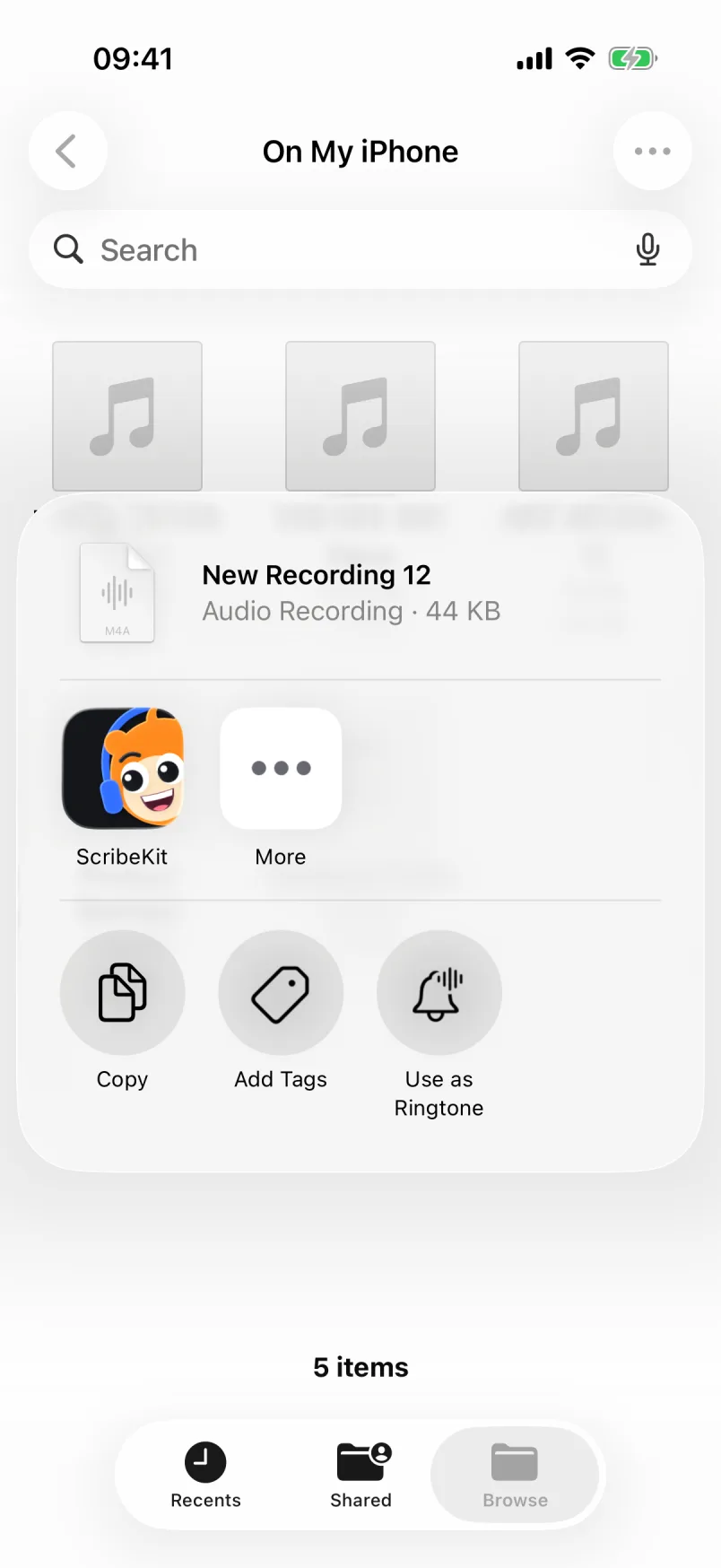
- In the share sheet, tap ScribeKit. If it is not in the row of apps, swipe to the end and tap More.
- ScribeKit lists the file with its length. Tap Add to ScribeKit, then Done.
- Open ScribeKit. It picks the file up and transcribes it on the phone.
What you get is a transcript split into timestamped segments. Tap a line to hear the audio behind it, search across every transcript, copy plain or timestamped text, or share it.
What you don't get, so you can decide before installing: no live transcript while you record (Voice Memos has one, ScribeKit transcribes after you stop), no speaker labels, no AI summaries, no Apple Watch app and no Mac app.
The free tier covers 25 languages and recordings or imports up to 30 minutes each, with 10 new transcriptions a month. ScribeKit Pro raises the limit to 3 hours (90 minutes while a Whisper model is active), removes the monthly cap and adds Whisper models for about 100 languages after a one-time download. It costs $1.99 a month, $9.99 a year with a 7-day free trial, or $19.99 once (prices vary by country).
One honest note on privacy: ScribeKit never sends your audio anywhere, but recordings sit in the app's storage, which your iPhone includes in its own backups like any other app data. If that matters for your work, check your iCloud Backup settings.
Voice Memos or an app: which should I use?
Here is the short version, from Apple's guide and ScribeKit's own limits.
| Feature | Voice Memos transcript | ScribeKit |
|---|---|---|
| iPhone | iPhone 12 or later | Any iPhone with iOS 18 or later |
| Languages | 10, matched to what the iPhone detects | 25 free, detected automatically; about 100 with Whisper (Pro, one-time download) |
| Language picker | None documented | Not needed for the 25; yes for Whisper |
| Files from other apps | No import path documented | Yes, from Files or the share sheet |
| Live transcript while recording | Yes | No, transcribes after you stop |
| Timestamps you can tap | Selecting a word moves the playhead there | Every segment, tap to play |
| Summaries | With Apple Intelligence (Writing Tools) | No |
| Price | Free, built in | Free up to 30 minutes per file and 10 a month; Pro for more |
If Apple's transcript works for you, keep using it. It is free, it is already on your phone, and for English on a recent iPhone it is a good default. ScribeKit is for the cases the built-in feature leaves out. And if you only want your words typed into a note or message as you speak, you need dictation, not a transcript; dictation vs transcription covers the difference.