Voice Memos transcribes ten languages: English, Spanish, Portuguese, Italian, French, German, Japanese, Korean, Simplified Chinese and Traditional Chinese. It has no language picker. It does not transcribe these 19 European languages: Bulgarian, Croatian, Czech, Danish, Dutch, Estonian, Finnish, Greek, Hungarian, Latvian, Lithuanian, Maltese, Polish, Romanian, Slovak, Slovenian, Swedish, Russian and Ukrainian. Here is why memos come out wrong, and how to transcribe the rest.
I make ScribeKit, the app I suggest for those 19, so weigh that. Where Apple's own transcript covers your language, use it.
Which languages does Voice Memos transcribe?
Apple's iPhone User Guide, in the iOS 27, iOS 26 and iOS 18 editions alike, says: "Audio transcription is available on iPhone 12 or later in English (all variants), Spanish, Portuguese, Italian, French, German, Japanese, Korean, Simplified Chinese, and Traditional Chinese. It's not available in all countries or regions."
That is the whole list. You may find blog posts claiming 13 languages, including Arabic, Russian or Turkish. Apple's guide does not say that, so I would not rely on it.
Three conditions sit on top of the language:
- The iPhone. iPhone 12 or later. An iPhone 11 gets no transcript in any language.
- The software. iOS 18 or later.
- Where you are. Apple says the feature is not available in all countries or regions and does not list them on that page.
If your memo is in one of the ten, your iPhone qualifies and the Transcript option still does not appear, the Voice Memos troubleshooting guide goes through the other causes one by one.
Why did my voice memo come out in the wrong language?
Because nothing in Voice Memos tells the iPhone which language you spoke. Apple's guide for the same transcription in Notes is more specific: it works "when the device language is set to" one of the ten languages, and if the transcript icon is missing, "your iPhone either doesn't meet the minimum requirements or doesn't detect a supported language."
In practice that produces two symptoms, and both are well documented by users:
- A supported language on a phone set to another one. In the Apple Community thread "How can I change the transcription language for Voice Memos?", a user in Germany with an English iPhone could not get German meetings transcribed. More than 250 people pressed "Me too".
- A recording that gets forced into English. In "Voice memo transcript language selection", someone recorded in Chinese and got a garbled English transcript, and asked: "Where is the button to select the transcription language?" More than 550 people pressed "Me too", and the thread was closed without an answer from Apple.
If your memo is in one of the 19 languages Apple does not list, the likely outcome is no transcript at all, or English-shaped nonsense where the system guessed. There is no setting that adds a language to Voice Memos.
Can I change the transcription language in Voice Memos?
Not in any way Apple documents. There is no language menu on the recording, in the More menu, or in Apple's guide.
Two things are worth trying if your language is one of the ten:
- Set the iPhone's language to the language you recorded in (Settings, General, Language and Region), open the memo again, then switch back. It is clumsy, it may not redo a memo that already has a transcript, but it follows Apple's own Notes wording about the device language.
- A per-app language. In the German thread, a community member suggested Settings, Apps, Voice Memos, Language. Some users report this helps. It is not in Apple's guide and I could not confirm it, so treat it as worth a try, not a fix.
Neither helps if the language is not one of the ten. For those you need an app with its own speech model.
The 19 languages Apple doesn't transcribe, and what auto-detection means
ScribeKit ships with NVIDIA's Parakeet TDT v3 model inside the app. According to its model card, it covers 25 European languages and "automatically detects the language of the audio and transcribes it without requiring additional prompting." So there is no picker to get wrong: a Swedish memo on an English iPhone is transcribed as Swedish.
Six of the 25 overlap with Apple's list. The other 19 are the gap. Japanese, Korean and Chinese are the reverse case: Apple has them, Parakeet does not, so in ScribeKit they need a Whisper model (Pro).
| Language | Voice Memos | ScribeKit free (Parakeet) | ScribeKit Pro (Whisper) |
|---|---|---|---|
| English | Yes | Yes | Yes |
| Spanish | Yes | Yes | Yes |
| Portuguese | Yes | Yes | Yes |
| Italian | Yes | Yes | Yes |
| French | Yes | Yes | Yes |
| German | Yes | Yes | Yes |
| Japanese | Yes | No | Yes |
| Korean | Yes | No | Yes |
| Chinese (Simplified and Traditional) | Yes | No | Yes (one Chinese setting) |
| Bulgarian | No | Yes | Yes |
| Croatian | No | Yes | Yes |
| Czech | No | Yes | Yes |
| Danish | No | Yes | Yes |
| Dutch | No | Yes | Yes |
| Estonian | No | Yes | Yes |
| Finnish | No | Yes | Yes |
| Greek | No | Yes | Yes |
| Hungarian | No | Yes | Yes |
| Latvian | No | Yes | Yes |
| Lithuanian | No | Yes | Yes |
| Maltese | No | Yes | Yes |
| Polish | No | Yes | Yes |
| Romanian | No | Yes | Yes |
| Russian | No | Yes | Yes |
| Slovak | No | Yes | Yes |
| Slovenian | No | Yes | Yes |
| Swedish | No | Yes | Yes |
| Ukrainian | No | Yes | Yes |
| About 70 more (Arabic, Hindi, Turkish, Vietnamese and others) | No | No | Yes |
A "Yes" means the model accepts the language, not that every recording comes out perfect. Accuracy depends on the audio, the accent and the language itself.
How to transcribe a Polish, Dutch, Ukrainian or Swedish voice memo on iPhone
You keep recording in Voice Memos as usual and send the memo to ScribeKit when you want text. This works on any iPhone with iOS 18 or later, including an iPhone 11, and needs no internet.
- Install ScribeKit and open it once. The model is already inside the app; there is nothing to download and no account.
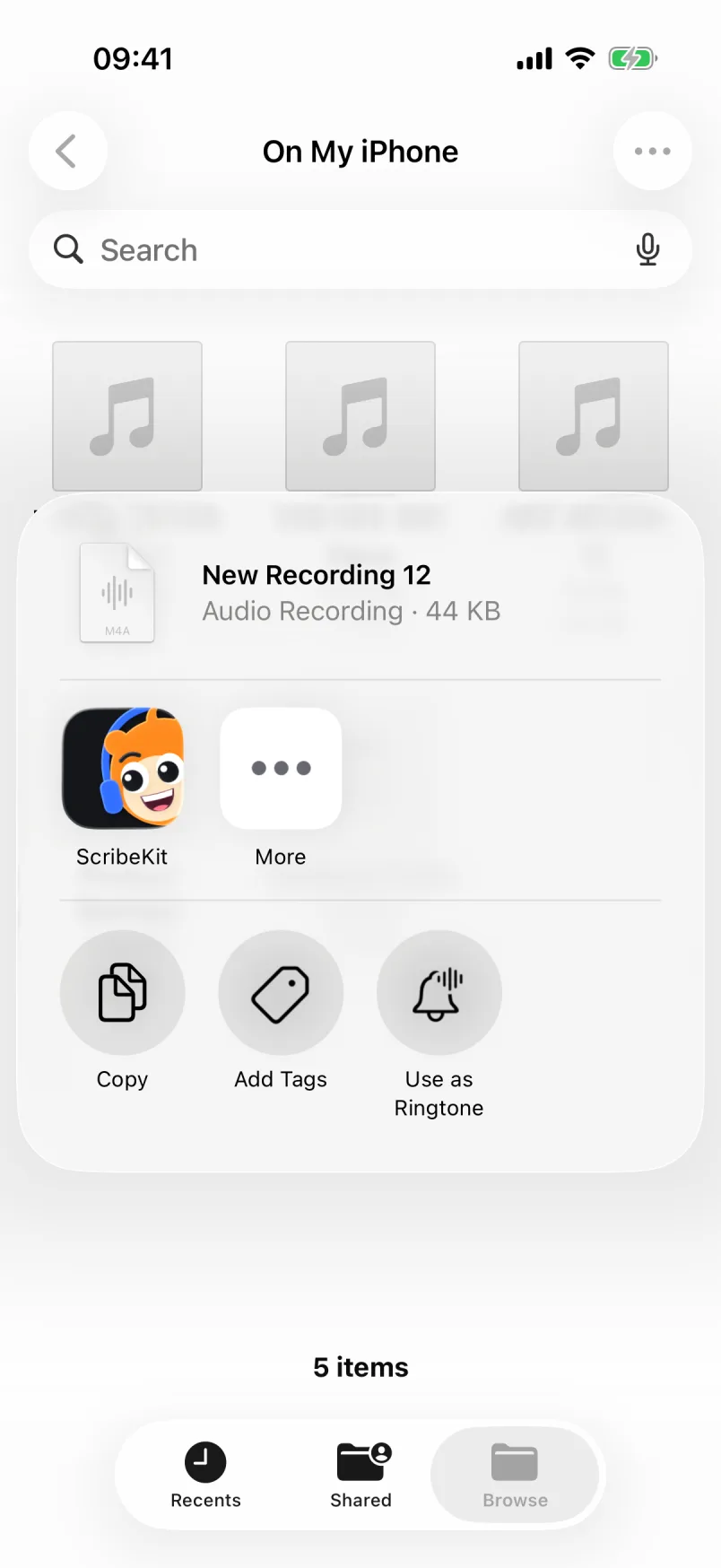
- In Voice Memos, tap the recording, tap the More button, then Share.
- Choose ScribeKit in the share sheet (tap More at the end of the app row if it is hidden).
- Tap Add to ScribeKit, then Done, and open ScribeKit. It picks the file up and transcribes it.
You get a transcript in timestamped segments: tap a line to hear it, search, copy plain or timestamped text. There are no speaker labels, no live transcript while recording and no AI summaries.
The free tier covers all 25 languages, files up to 30 minutes each, and 10 new transcriptions a month. Pro ($1.99 a month, $9.99 a year with a 7-day trial, or $19.99 once) lifts the length to 3 hours (90 minutes while a Whisper model is active) and removes the monthly cap.
Honest caveat: Parakeet only knows these 25 European languages, and no model is perfect in all of them. If a recording is noisy or the accent is strong, a Whisper model can do better, at the cost of speed. You can re-transcribe the same recording with another model from the transcript screen and compare. Parakeet vs Whisper on iPhone goes into the trade-off.
What about Japanese, Korean, Chinese and the other 70 or so languages?
If you have an iPhone 12 or later and the memo is in Japanese, Korean or Chinese, Voice Memos is the free answer. Try that first.
For everything else, or for an older iPhone, ScribeKit Pro adds OpenAI's Whisper in five sizes, from Tiny (about 75 MB) to Large (about 630 MB). Whisper covers about 100 languages in total. Two things to know before paying:
- It needs the internet once per model. You download a size once from its public repository; after that it transcribes offline like the built-in model.
- Accuracy varies a lot by language. OpenAI's own Whisper README says "Whisper's performance varies widely depending on the language." Common languages do well; low-resource ones can be rough.
Whisper lets you pick the language or leave it on auto-detect, which also fixes the wrong-language problem: if auto-detection guesses wrong on a short clip, set the language and re-transcribe. While a Whisper model is active, recordings are capped at 90 minutes because the model needs more memory.
If you would rather not pay, Whisper is free and open source on a computer. Running it on a laptop works well, as long as you are comfortable moving the audio off your phone to do it.
The short version: check your language against Apple's ten first. If it is there and your iPhone qualifies, Voice Memos is free and good. If it is one of the 19, the built-in model in ScribeKit handles it for free, on the phone.